


ERP that makes your business easier to run as it grows
ERP stands for enterprise resource planning. In practice it means one system with finance, purchasing, stock, sales, production and projects, all working from the same data.

The difference an ERP makes
What a good ERP system changes is where your people spend their time. Finance stops rebuilding the month from three systems and starts explaining what the numbers mean, operations can see stock and orders as they stand rather than as they stood last week, and when the business grows the system takes the extra volume instead of your headcount.
Most businesses start looking seriously at ERP when growth starts to stretch the tools they began with, and they want a single place that brings their people, processes and numbers together.
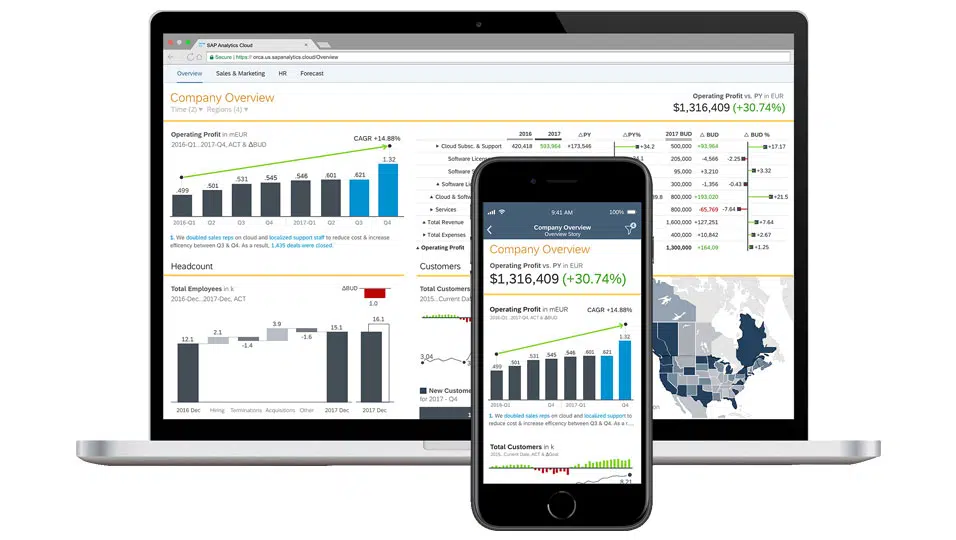
What good looks like with ERP
The most visible change is usually month end, which tends to drop from weeks to days because the numbers no longer have to be assembled before anyone can explain them. Underneath that, the uncertainty about whose spreadsheet is correct stops, because there is one set of figures that everyone works from. Growth also gets easier to absorb, since new sites, new products and new people land on a system built to cope rather than on a team already at capacity. Audit stops being a challenge, because the trail showing how a figure was arrived at is already there.
The most visible change is usually month end, which tends to drop from weeks to days because the numbers no longer have to be assembled before anyone can explain them. Underneath that, the uncertainty about whose spreadsheet is correct stops, because there is one set of figures that everyone works from. Growth also gets easier to absorb, since new sites, new products and new people land on a system built to cope rather than on a team already at capacity. Audit stops being a challenge, because the trail showing how a figure was arrived at is already there.
ERP helps you run your business and supports processes across:
-

Finance
-

Procurement
-

Marketing
-

Sales
-

HR
-

Manufacturing
-

Services
Benefits of ERP
What are the
key benefits of ERP?
-
Higher Productivity
Streamline and automate your core business processes to help everyone in your organisation do more with less.

-
Deeper Insights
Eliminate data silos, gain a single source of truth, and get fast answers to mission-critical business questions.

-
Accelerated Reporting
Fast-track business, financial, and management reporting and easily share results. Act on real-time insights and improve performance.

-
Lower risk
Maximise business visibility and control, ensure compliance with regulatory requirements, and predict and prevent risk.

-
Simpler IT
One integrated system replaces several separate applications, so there is less to maintain, connect and pay for.

-
Improved Agility
With efficient operations and ready access to real-time data, you can quickly identify and react to new opportunities.

Choosing the right system
Most of the businesses Codestone works with are best suited to one of three platforms.
SAP Business One is the usual answer for growing businesses up to around 250 people, and it earns its place fastest where finance has to sit next to stock, production or distribution.
Microsoft Dynamics 365 Business Central suits businesses that already use Microsoft 365 and want finance and operations in the same place, with a shorter adoption curve because the tools look familiar.
SAP S/4HANA, which SAP now sells under the name SAP Cloud ERP, is the step up from both, for businesses whose day-to-day operations or reporting obligations have outgrown a lighter system.
The platform you choose depends on how demanding your processes are, not how large your business is. We implement all three, so we’ll work together to choose the one that fits you best.
SAP Business One · Microsoft Dynamics 365 Business Central · SAP S/4HANA
Best-of-Breed
ERP Technology Solutions



SAP S/4HANA Cloud, public edition
The ready-to-run cloud ERP that delivers the latest industry best practices and continuous innovation.

Microsoft Dynamics 365 Business Central
Microsoft Business Central. Affordable, easy-to-use solution for Small & Medium Businesses
Working with Codestone on ERP
For most businesses, a conversation about ERP is a conversation about the problems they are living with. Codestone works in partnership with you to understand what is causing them and to choose the platform that will fix them for the long term. That starts with how your finance and operations run today, where your constraints sit and which of the three platforms genuinely fits your needs.
Once the right platform is agreed, we design the implementation with you, paced to what your business can realistically take on while still trading and delivered against a method we have refined over 30 years. Training your people is part of the project from the start, because a system only returns what your people can get out of it.
Then we stay with you. As your priorities shift and your business grows, the system should keep pace with both, and we will support you and the system as that happens.
When is ERP the right decision?
The trigger is usually operational rather than strategic. Somebody is reconciling two systems by hand every week, or the month end close has stretched from days into a fortnight, or growth has reached the point where the next step means hiring rather than automating. Those are worth acting on. A general sense that the technology feels dated is not, because a project started without a specific problem usually finishes without a specific result. If you cannot say what would be measurably different afterwards, wait until you can.
ERP services beyond the implementation
Not every ERP conversation starts with replacing the system. If you already run one and suspect it is underperforming, an ERP Health Check looks at how it was configured against how you work now and gives you a written view of what is worth fixing. If the system is fine but the support around it is not, you can move that to us without touching the ERP itself.
ERP Use Cases
Procurement and Sourcing
Procurement modules help your business source the materials and services you need to make and sell your products. Purchase requests, quotes, contracts and approvals are handled in one place, and much of the routine work is automated. That helps you avoid buying too much or too little, negotiate better with suppliers and connect with buyer networks.
Inventory Management
An inventory management module shows your stock levels in real time, including stock on its way to your warehouse. Your operations team can compare what is available against sales data and decide whether to raise a purchase order. Your warehouse team can fulfil more orders each day, because the module shows exactly where every item is kept.
Human Resources Management
Many ERP systems include an HR module that manages time, attendance and payroll for your people. You can add to it as your needs grow, with tools for workforce analytics and employee experience.
Finance
The finance module sits at the core of most ERP systems. It runs your general ledger and automates key financial tasks. Your finance team can track payables and receivables, close the books faster, produce financial reports, comply with revenue recognition standards and manage risk.
Manufacturing
If you make products, a manufacturing module helps you simplify production and keep up with demand. It usually covers material requirements planning, production scheduling, manufacturing execution and quality management.
Logistics and Supply Chain Management
The supply chain module tracks goods and supplies as they move through your supply chain. Inventory, warehouse operations, transport and logistics sit in one view, so you can see what is happening and keep your supply chain resilient.
Service
Service modules help your business deliver reliable service to your customers. They can cover in-house repairs, spare parts, field service management and service-based revenue. Built-in analytics help your service team and technicians solve customer issues quickly, and that builds loyalty.
Sales and Marketing
With a sales and marketing module, your team can turn a quote into a sales order in minutes and send system-generated invoices to your customers. Your sales and marketing teams can see where each customer sits in the sales cycle and decide the best next step. Marketing tools let you import lists and reach new prospects with email and advertising across several channels.
Project Management
A project management module tracks the costs and resources of each project, which you need for accurate billing. As well as showing where each project stands, it records the consultants assigned, hours logged, travel expenses and communication with your client. When a project reaches an agreed milestone, the module can create the invoice and send it to your client automatically.
Ecommerce
An ecommerce module turns your website into an online store that can take orders and payments. Your marketing team can list new products, update product content, respond quickly to trends and change the look of the site. Because the store is part of your ERP, you need no separate integrations for order management, inventory or CRM. Every order, customer record and payment flows straight into the system.
Customer Relationship Management (CRM)
A CRM module brings your customer information together. When a customer or prospect fills in a form on your website, the details flow into the CRM and alert a salesperson to follow up. Every customer’s purchase history is held in one place, so you can offer them relevant products, such as a new range from a brand they already buy or accessories to go with it. When a customer has a question or a problem, your service team can resolve it faster because they can see every previous interaction.
Why Codestone for ERP
Very few technology partners can implement both SAP and Microsoft ERP well. Most specialise in one, and the recommendation tends to follow the portfolio. Doing both is why a conversation with Codestone starts with your business and its challenges.
Behind that sit 30 years of ERP work and more than 2,200 projects for more than 750 clients.
Some of the businesses we have supported through ERP implementation
We worked with Consilient Health, a pharmaceutical distributor, and Taste Connection, a food and drink business, to implement SAP Business One. See how we’ve added real value to their business below.
Codestone implemented SAP Business ByDesign for iiPay, a global payroll provider, taking four days out of its month end close and two working days off its revenue reporting deadlines.
Common questions
-
What is ERP, and does your business need one?
If your operational data lives in more than one place and somebody spends real time keeping those places in agreement, you are arguably already paying for an ERP, in labour rather than licence. The usual trigger is not a strategic decision to buy software, it is growth making that reconciliation work unsustainable.
-
What does an ERP system cost?
Licence cost is the smaller part. The total is driven by user numbers, the modules in scope, how many companies and currencies are involved, how much integration is needed, how much data has to be migrated and cleansed and how much training the business needs. Our SAP Business One pricing page sets out real package bands as a starting point. Business Central and S/4HANA public edition are both subscriptions billed per user per month, so the licence line moves with headcount and with which licence type each person needs. The implementation alongside it is the larger number, and on both platforms it rises with the amount of process redesign the project has to absorb.
-
How long does an ERP implementation take?
For a smaller business on a standard implementation, months rather than years. For a larger programme with integrations, data migration and a phased rollout, longer, and usually staged so value arrives in instalments instead of all at the end.
-
Can we move off our existing system without losing our history?
Yes, and how much history you bring is worth deciding deliberately. Most businesses migrate open transactions and master data, then keep a defined period of history in an accessible archive. We work that out during design.
-
Should our ERP system be in the cloud?
For most businesses now, yes, and the platforms we implement are cloud first. On-premises and hybrid still make sense where data residency, a specialist integration or an existing infrastructure investment calls for it. It is worth settling early, because it affects cost, upgrade path and how much work lands on your IT team.
-
Is our business too small for ERP?
Usually not. Modern ERP platforms scale down well, and a business of 30 or 40 people with real stock or project complexity often gets more out of ERP than a larger, simpler one.
